Exclusive homeowner leads, sent straight to your phone.
We build and pay for the ads, screen every homeowner, and send each lead to one contractor: you. Then you work it in Lead HQ, our app built for one job: calling fast and closing.
- Ad spend built into your lead price
- Every lead sent to you only, never resold
- No retainers or monthly fees
 Lead HQ
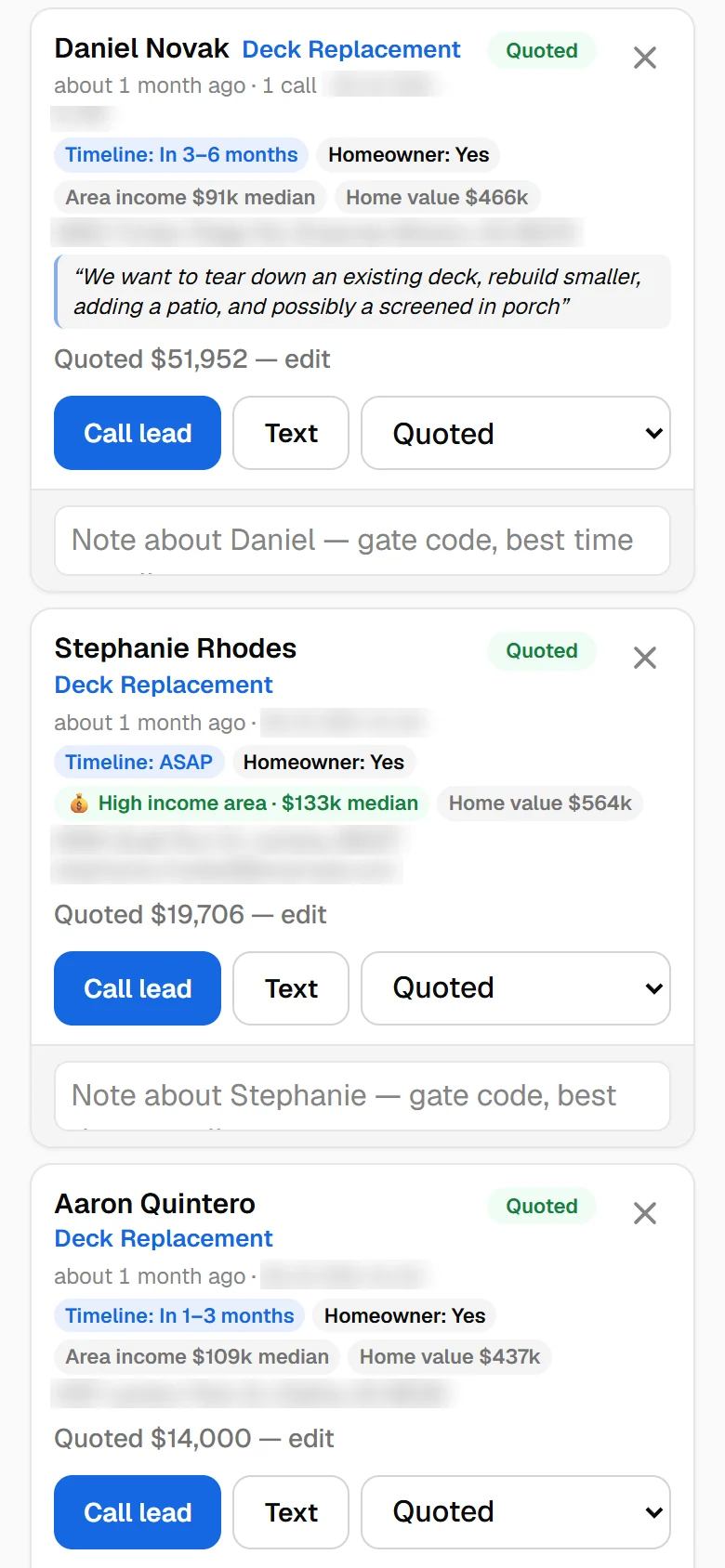
Lead HQ on a contractor's phone. Demo data, contact details blurred.
One system, from the ad to the signed job
You don't hire us to "do your marketing." You get ready homeowners and the tool to close them.
Ads we build, run and pay for
We run Facebook and Instagram ads for your trade, aimed at the zip codes you serve. The ad spend is built into your lead price, so there's no ad budget to manage and no ad account for you to set up.
Leads that are yours alone
Each homeowner goes to one contractor. We never resell a lead or send it out to a list, and Lead HQ blocks the same homeowner from being sent to you twice.
Homeowners who are ready
Every lead tells us the project, the zip code, when they want to start, and that they own the home. Small repairs, renters and "not sure when" are screened out before they reach you.
Lead HQ to work them
New leads land on your phone instantly. Call or text in one tap, track every estimate and quote, and see exactly what your leads are turning into.
What working with us looks like
Six steps, from your first call with us to a steady flow of jobs.
-
1
Strategy call
We talk through your trade, the areas you want to work, the jobs you want more of, and how many leads you can handle. If your area is a fit, we plan your campaign right there on the call.
-
2
Your setup
We lock in your trade, your service area (a list of zip codes or a radius around your shop), your lead price and how you'd like to pay. You get a text and an email with your Lead HQ login. Turn on notifications, take the short guided tour, and you're ready.
-
3
We launch your campaign
We build your campaign from the version that's already producing leads in your trade (ad videos, copy and lead form) and aim it at your service area. It goes live at midnight, so leads can start coming in the next day.
-
4
Leads hit your phone
Every new lead arrives as a notification on your phone, any time of day. With Instant Call, your phone rings with the lead read out to you, and you press 1 to be connected straight to the homeowner, from 9 AM to 6 PM in their time zone.
-
5
You call, quote and close
Move each lead along as you go: Booked, Quoted, Sold. Quotes and sales carry a dollar amount, so you always know what's on the table. If a lead sits uncalled for 6 hours, Lead HQ reminds you, then once a day, only between 8 AM and 6 PM.
-
6
We keep it running and keep improving it
We review every campaign daily: we scale what's working, cut what isn't, and refresh ad creative before it goes stale. When you mark a lead Booked or Sold, that result is sent back to Meta so the ads find more homeowners like the ones who bought. Want a set number of leads? Set a weekly or monthly cap: ads pause on their own when you hit it and restart when it resets.
Everything you need before you dial
No guessing who you're calling. Every lead card in Lead HQ shows:
- Name, phone and address, with a map link
- The project they want, like a deck replacement or a kitchen remodel
- When they want to start: ASAP, 1–3 months or 3–6 months
- Confirmed homeowner: renters never reach you
- Their own words: the project details they typed in
- Area income and home value for their zip, so you can size up the job
How homeowners are screened
They answer what they want built, their zip code, when they want to start, and whether they own the home. Anyone who only needs a small repair, isn't the owner, or isn't sure when is filtered out. Phone numbers are checked when they sign up, and a lead outside your service area isn't sent to you.
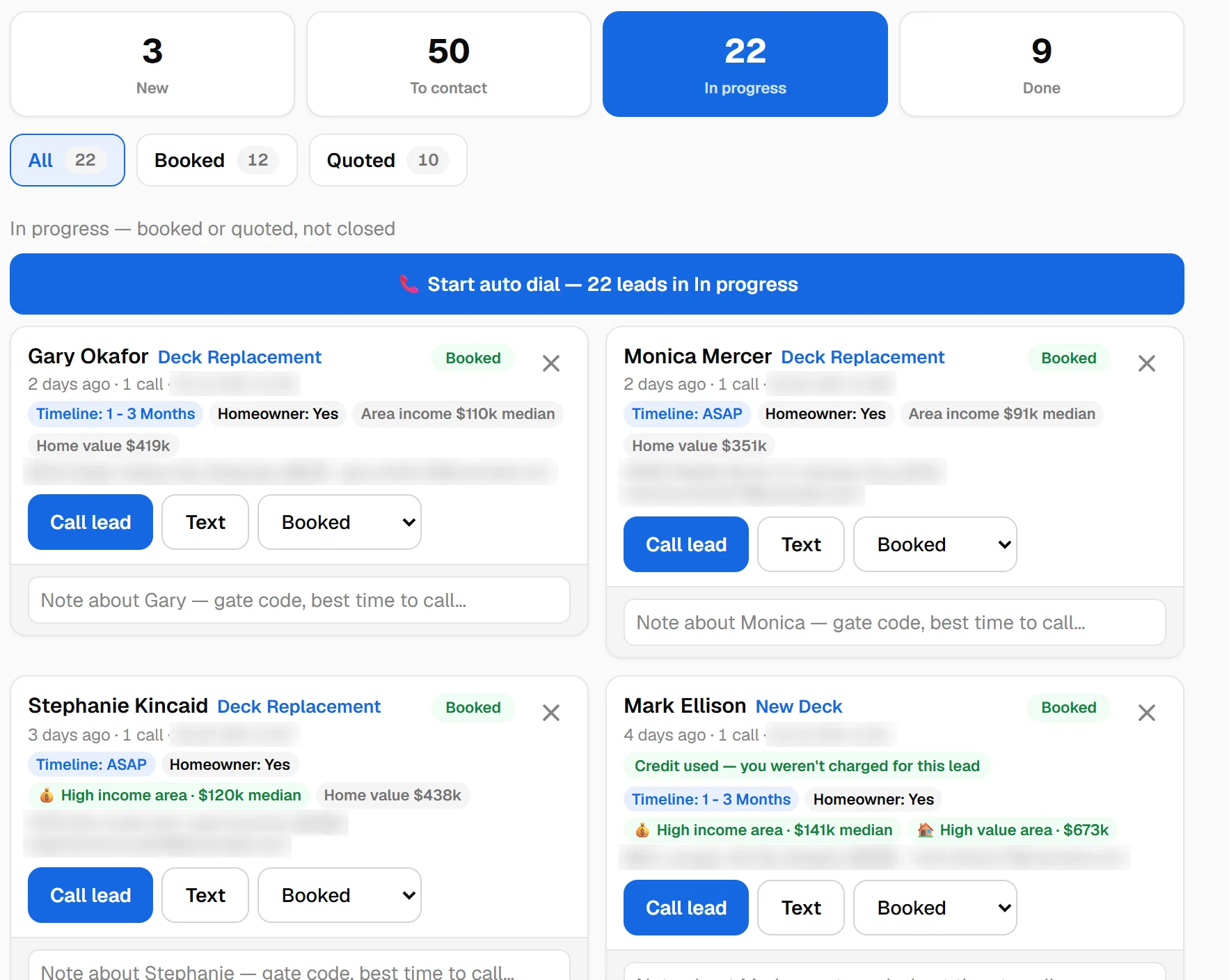
The app you work every lead in
Built for contractors on the job site, not for sitting at a desk.
Instant alerts
A notification on your phone the second a homeowner comes in, any hour of the day.
Instant Call
Your phone rings with the lead read out to you. Press 1 and you're talking to the homeowner.
One-tap call and text
Call from your own phone, or send a first text that's already written for you.
Auto dial
Work through a whole list back to back without hunting for the next number.
A simple pipeline
Four boxes, New, To contact, In progress and Done, so nothing slips through the cracks.
Quotes and sales tracked
See your pipeline value and revenue won, and how many estimates you're booking.
Your dashboard
Today, last 7 days, this month or all time: customers, booked estimates, quotes, revenue and speed to lead.
Reminders
If a lead hasn't been called, Lead HQ nudges you during working hours until it is.
Room for your team
Give your office manager or sales rep their own login so the right person makes the call.
What we ask of you
The contractors who win the most with us all do three things.
Call fast
Our target is every new lead called within 5 minutes. The homeowner just asked for a quote, and speed is the biggest thing you control.
Keep your leads updated
Mark leads Booked, Quoted and Sold. It keeps your numbers honest, and it teaches the ads which homeowners turn into jobs.
Keep a working card on file
Leads are charged as they're delivered. If a card declines, your leads pause until it's updated.
Questions contractors ask us
Ready to see if your area qualifies?
Book a strategy call. We'll look at your trade and your area and tell you straight whether it's a fit.